最新情報

最新のリリース、改善点、修正点をご覧ください。

@NotionHQをフォローする
3.6

Notion 3.6: External Agents, HTML blocks, and more

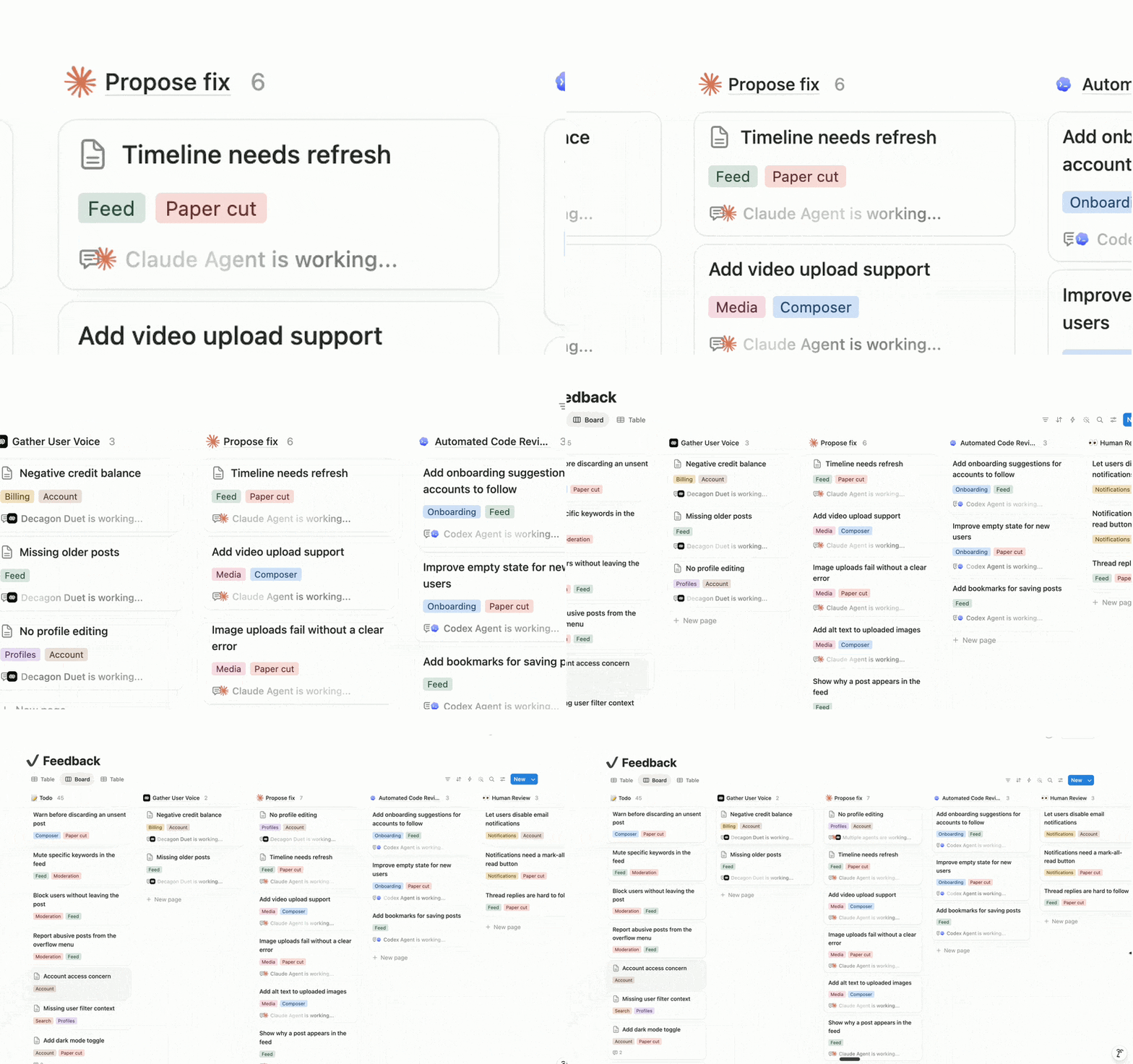
Your agents shouldn’t be stuck in one-off chats. Now you can bring multiple agents into a single UI with the rest of your team, so you can automate entire workflows end-to-end.

And there’s a lot more. AI Meeting Notes now include speaker labels (a top request!), your Notion Agents can read and write more filetypes like Excel and PowerPoint, and you can build interactive HTML blocks, like an ROI calculator.

Orchestrate External Agents (Claude, Cursor, and more soon)

Some of your agents might live in CLIs, IDEs, and separate apps, doing solo work the rest of the team can’t see or build on. Now you can assign them tasks from a board shared with your whole team, @-mention them like teammates, and watch them run.

Claude and Cursor are the first two External Agents in Notion. That means you can reimagine entire end-to-end processes with full automation, right alongside the rest of your team’s work.

Smarter meeting summaries with speaker labels

AI Meeting Notes now identifies speakers in your meetings, based on whose microphone is active. This improves meeting summaries and makes sure follow-ups are assigned to the right teammate. And this is just the beginning; we’ll keep making speaker identification even better!

Add interactive HTML blocks to your Notion docs
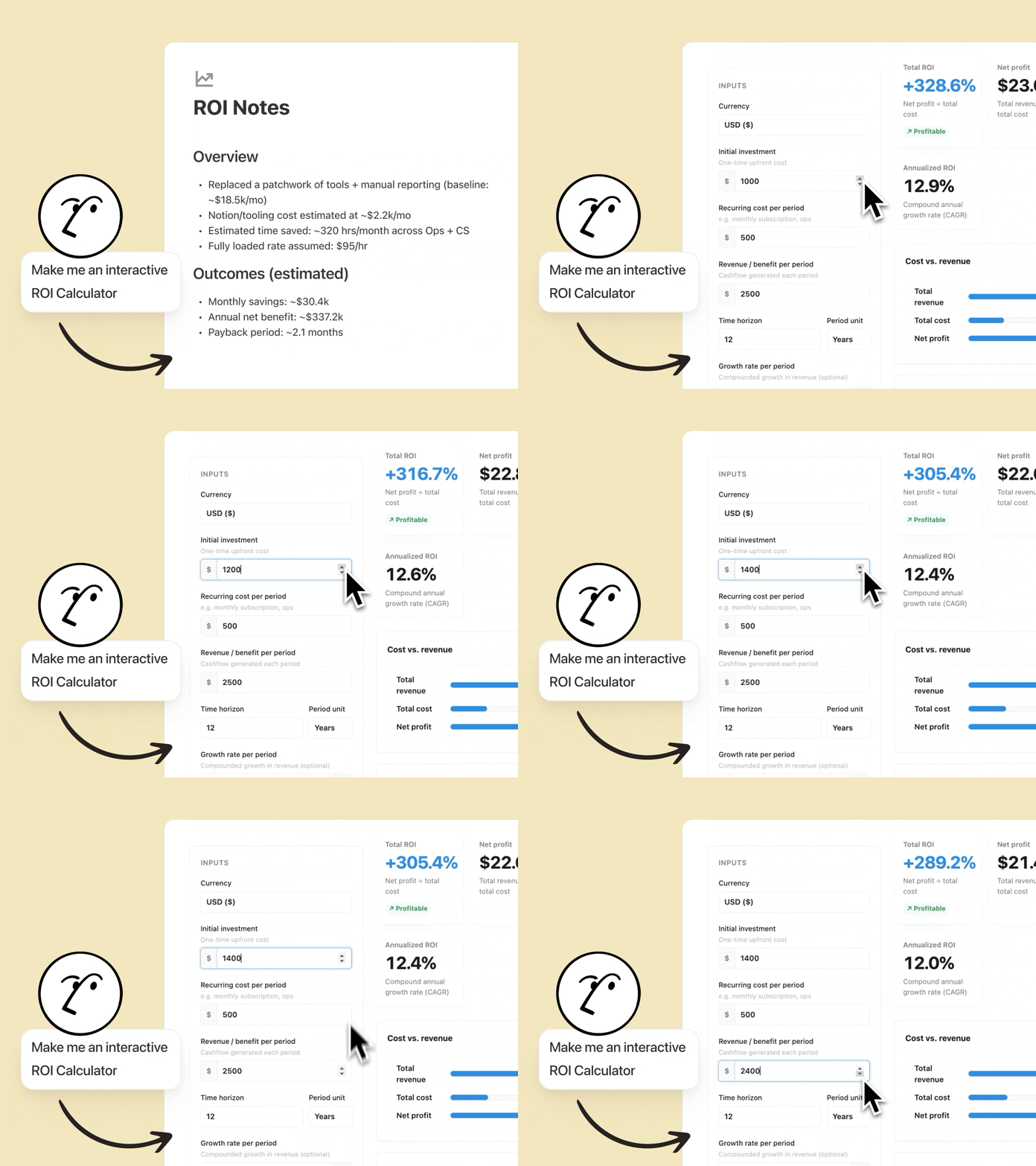
Notion Agents can now create interactive HTML blocks, and we can’t stop tinkering with them. The best part is that they live in Notion, so anyone on your team can use them or iterate on them. Some examples we love:

  • Build a ROI calculator: Watch your customers’ eyes light up when they see how much they’ll save by using your solution. Customize it with details like their industry or current tool stack.

  • Quiz your teammates: Turn a doc about your latest feature into an interactive quiz your team will remember. Your Agent will identify what matters, create relevant questions, and score results at the end.

  • Map your org chart: Visualize your people database as an org chart so new hires onboard faster and cross-functional work gets done. Do it directly in Notion, with no need to open another tool.

Your Notion Agents now speak Microsoft

Your Notion Agents now work with PPTX, XLSX, DOCX, and more. Give your agents context by attaching spreadsheets, decks, Word docs, and PDFs—your agent reads them like any other source.

And your agents can create these files for you too: turn a page into a polished PowerPoint, spin a database into an Excel model, or summarize a pile of PDFs into one clean doc. Your legal and finance teams will thank you. Notion 🤝 Microsoft.

Your agent can use Outlook for you

Another nice one for our Microsoft shops. Connect Outlook Mail and Calendar and your Notion Agents can run your inbox and your schedule for you. Triage incoming email, draft replies in your voice, and send messages; all you have to do is ask.

Your agent can find open times, schedule meetings, and keep your calendar in order so you spend less time wrangling logistics and more time on the work that matters.

Five new MCP connections for Custom Agents

People are loving Notion MCP—usage has 10×’d in the past month. Now your Custom Agents get five more connections out of the box: Mercury, Mixpanel, Miro, Box, and ClickHouse.

They join the connections already available (like Figma, GitHub, Zapier), so your agents can pull financial data from Mercury, dig into product analytics in Mixpanel, or update a Miro board, all with no custom setup required. Find and connect every available integration from the new connections tab in your settings.

More models, without the lock-in

Your agents support a fresh lineup of new models, so you can pick the right brain for the job, whether you need speed, deeper reasoning, or a creative spark. Use the latest frontier intelligence from Opus 4.8 or Grok 4.3, or choose a more cost-efficient model like the new open-weight GLM 5.2.

Track Custom Agent actions in the audit log

Your security team now gets more visibility into how AI is being used. The audit log includes Custom Agent activity, so you can see when an agent runs, what it changed, and who triggered it, making it easier to review workflows, troubleshoot issues, and stay compliant. Available on Enterprise.

And a few more …

  • Custom Agents for Slack Enterprise Grid: Custom Agents now work across your full Slack org. Talk to your sales rep or learn more.

  • Notion Workers in the credit dashboard: Find Worker usage in the Notion credits dashboard, so admins can track everything in one place. Learn more →

  • Build Notion Workers on Windows: Windows developers, you’re in. The Notion CLI now installs on Windows through npm, so building and deploying Notion Workers is no longer limited to Mac and Linux. Read the docs →

  • Upload audio to AI Meeting Notes: Bring meetings recorded elsewhere into Notion. Upload an audio file and AI Meeting Notes will transcribe and summarize it like any other meeting.

  • Duplicate custom agents: Found a setup that works? Copy any custom agent in a click and tweak it for a new team or use case—no need to rebuild from scratch.

  • Agents can use your people directory: Now you can give your agents access to your people directory, so they have more context about your team.

テーブルのセルを結合

要望の多かった機能がついに登場しました!テーブルでセルを結合できるようになりました。

これにより、スプレッドシートと同じように、複数の列にまたがるヘッダーやその他の構造化されたレイアウトを作成できます。

Xでお知らせを見る →

3.5

3.5:Notionの開発者プラットフォーム

Notion Developer Platform

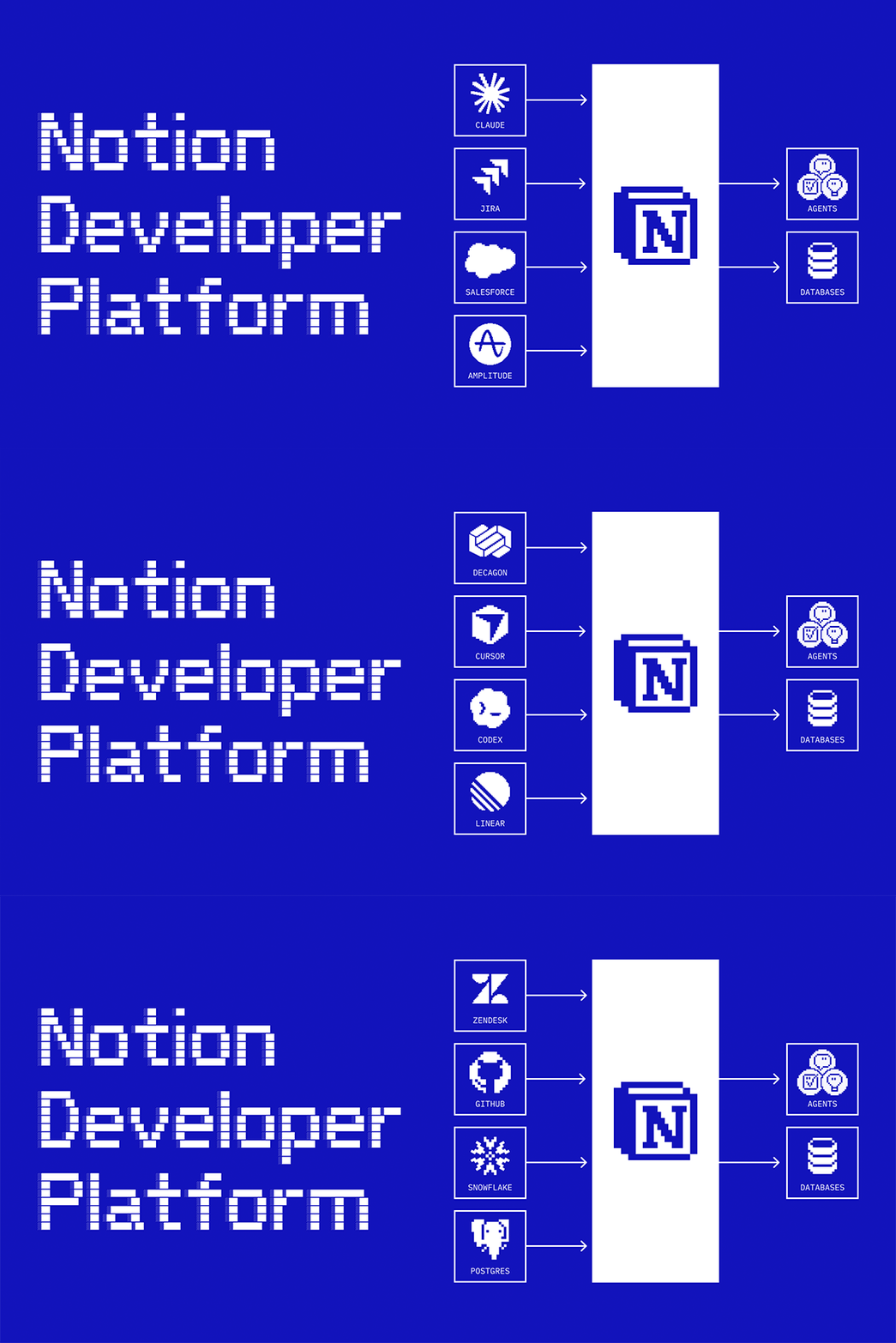
Notionとは?開発者向けですか?ごもっともな疑問です。確かに、Notionはこれまで、「開発者ファースト」なプラットフォームであったとは言えません。それが今日変わります。

Notion開発者プラットフォームのご紹介。

これからは、開発者自身(そしてコーディングエージェント)の手で、あらゆるデータの同期やエージェントツールの構築が可能になります。これらはすべて、Notionのインフラストラクチャ上で動作します。また、お好みのエージェント(Claude、Codex、Decagon、あるいは自作のエージェントなど)をNotionに組み込んで活用することも可能です。これにより、Notionはあらゆるデータが集約された「ひとつの共有キャンバス」へと進化し、チームとエージェントが力を合わせて働けるようになります。

チームの全エージェントをコーディネートする(アルファ版)

Orchestrate all your team’s agents

外部エージェントAPIを使えば、お気に入りのエージェントをNotionに導入できます。ご自身でビルドした自作エージェントも、同様に持ち込み可能です。また、ClaudeやCodex、Decagonなどとも提携しているため、これらのエージェントはそのまま利用できます。これからは、Notionがいわゆるオーケストレーションレイヤーとなります。例えば、Decagonのチケットがコーディングエージェントに送られ、エージェントが修正案を提示し、チームの承認を仰ぐといった連携が可能になります。Notionでは、エンジニアに限らず、誰でもエージェントを活用できます。外部エージェントの順番待ちリストに登録する →

Notionは、仕事が生まれ、発想が練られる場所です。だからこそ、私たちはここを「AI層」と位置づけ、エージェントをできる限り実務の近くに配置したいと考えています。

Dan Gilbert氏

Brainlabs、CEO

あらゆるデータソースを同期(ベータ版)

Sync any data source

APIを利用して、あらゆるデータソースをNotionデータベースに同期します。チームでサーバーを管理する必要はありません。Notionの新しいデータベース同期機能は、Notion側のインフラで稼働するワーカーによって支えられています(詳細は後述します)。Zendeskからチケットを取り込み、エージェントに修正案の一次回答を作成させます。Salesforceから顧客データを同期し、エージェントに詳細なレポートを作成させます。StravaとSpotifyのデータを連携させ、最高のランニング用プレイリストを構成します。必要なコンテキストが、これからはNotion上で共存できます。デモを視聴する →

ワーカーは、Notionとの深い連携を構築するためのツールを提供してくれます。これは、以前は存在し得なかったものです。毎晩実行されるワーカーがあり、Googleドライブ内の編集不可能なPDFを同期して、整理されたNotionデータベース内の完全に編集可能な豊富なコンテンツのページに変換します。これにより、チームとエージェントがこのデータを活用できるようになり、大幅な時間の節約につながっています。

Sam Lambert氏

PlanetScale、CEO

エージェント用のカスタムツールを構築する(ベータ版)

Build custom tools for your agents

NotionやMCPが単体ではカバーしていない機能を、カスタムエージェントに持たせることができます。独自のロジックをコードで記述し、ワーカーとしてデプロイします。決定論的に動作するため、LLMによる推論よりも信頼性が高く、トークンコストもごくわずかで済みます。アセットの生成、内部データのクエリ、他アプリでのアクション実行、これらすべてを自動化できます。ドキュメントを読む →

私はNotionワーカーをインフラだと考えています。データの自動入力から更新、システムのセットアップまで、必要な工程をすべて担ってくれます。

Austin Tedesco氏

Every、グロース責任者

どこからでもNotionのワークフローをトリガーする(ベータ版)

Trigger Notion workflows from anywhere

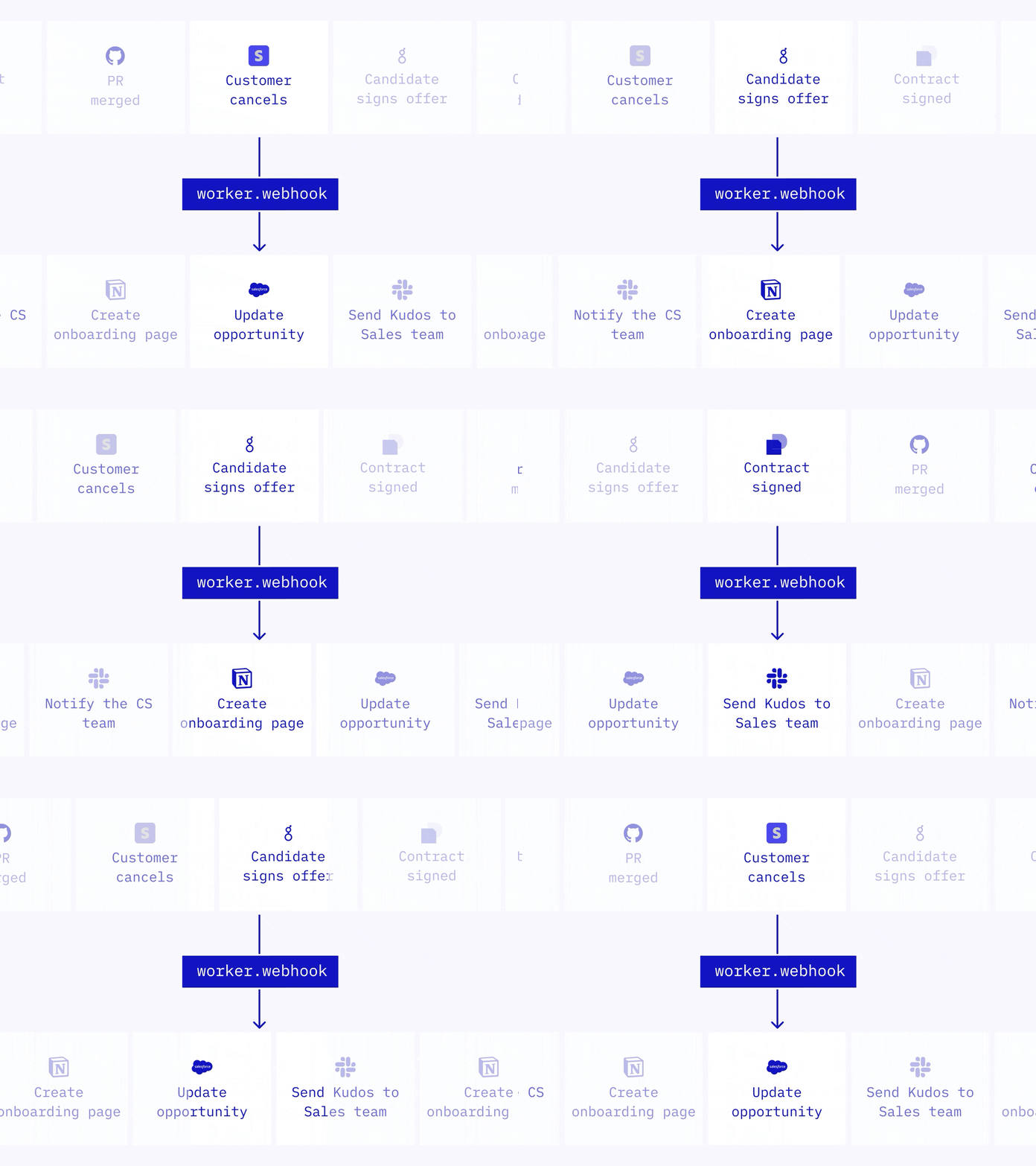
かつてWebhookは一方通行の仕組みでした。Notionから他のアプリを起動することはできても、外部からNotionを動かすことはできなかったのです。しかし、あらゆるアプリからNotionを直接起動できるようになりました。ワーカーがWebhookを受信し、ロジックを実行、Notion内でのアクションや他のAPIの呼び出しを行います。PRマージ後のタスククローズ、サブスクリプションの変更に合わせたCRMの更新、内定承諾時のオンボーディングドキュメント作成といった活用が可能です。ドキュメントを読む →

Notionワーカーのご紹介

Meet your Notion Workers

私たちが「ワーカー」と名付けた新しいプリミティブが、データベースの同期やエージェントツール、Webhookトリガーといった仕組みの原動力となっています。Notionワーカーは、カスタムコードを実行するためのホスト型ランタイムです。そのため、自分でサーバーを立てて管理しなくても、Notionの機能を拡張できます。あなた(とコーディングエージェント)がコードを書き、CLIでデプロイ。実行はセキュアなサンドボックス環境で行います。ベータ版をご利用中は、無料でワーカーをお試しいただけます。2026年8月以降、ワーカーの実行にはNotionクレジットが必要になります。ドキュメントを読む →

ワーカーによって他ツールのAPIに直接連携し、手作業だったデータの引き継ぎプロセスをすべて自動化できます。Notionがツール同士をつなぐ接続層となり、ツール間に存在するあらゆるギャップをワーカーが埋めてくれます。

Brian Emerick氏

Vercel、技術プログラムマネージャー

開発者とコーディングエージェント向けに構築されたNotion CLI

A Notion CLI, built for devs and coding agents

Notionコマンドラインインターフェース(CLI)は、開発者とコーディングエージェントがプログラムを介してNotionを自在に操作するための、新しいインターフェースです。ワークスペースへのサインイン、Notion内の情報の読み取りや操作、ワーカーの構築とデプロイ、さらにはチームのニーズに合わせたNotionの拡張などに使用できます。To install, run curl -fsSL https://ntn.dev | bash.デモを視聴する →

Notionエージェントをあらゆるアプリで使用する(アルファ版)

Use your Notion Agents in any app

まもなく、Notionエージェントは、Notionの外でも利用可能になります。NotionエージェントSDKを使えば、他のツール内にエージェントを埋め込めます。CRMのボタンをクリックするだけで、案件レポートを作成できます。ワークスペース内の検証済みナレッジを基に、MS TeamsやDiscordで多発する質問に自動で回答できます。また、顧客のコンテキストをAmplitudeやHexといったデータ分析ツール、さらにはあらゆるダッシュボードに取り込むこともできます。エージェントSDKの順番待ちリストに登録する →

すべてのコネクトを1つのタブで管理

Manage all connections from one tab

ワークスペース設定内の「コネクト」タブをアップデートしました。すべてのコネクトを一箇所に集約し、チーム全体で利用可能なリソースをひと目で確認できるようにしました。個人、ワークスペースごとのコネクト、API認証に使用する個人用アクセストークン、内部API接続がここに含まれます。さらに、各アプリのリスティングには、対応するすべてのコネクトタイプがまとめて表示されます。設定コネクトから確認できます(または、こちらをクリックします)。

「殿堂入り」エージェント

Agents “hall of fame”

どのようなエージェントを作るべきかという判断は、開発において最も苦労する部分かもしれません。そこで、RampやClay、Vercelなどによる最高のエージェント事例を一つのライブラリにまとめました。各事例には、必要なリソース(データベース、ページ、ツール)のチェックリストと、コピー&ペーストで使えるプロンプトのサンプルが用意されています。まずは一つ選んでみてください。数分でセットアップしていただけます。コレクションを参照する →

他にも、開発者に重宝しそうなアップデートを行いました

  • マークダウンAPI:すでにご存知かもしれませんが、Notionページの読み書きをマークダウン形式で行えるようになりました。エージェントの標準的な思考プロセスに合わせた設計です。

  • Notion MCP:ミーティングノートやブロックコメントに対応しました。さらに、データベースの作成・更新時のトークン効率が91%向上しています。

  • Notion API:ワークスペースオーナーに限らず、すべてのメンバーがコネクトを構築できるようになりました。あわせて、ワークスペース単位のOAuthや個人用アクセストークンの使用にも対応しています。リリースを見る →

  • 開発者ポータル:app.notion.com/developersが、専用ポータルになりました。コネクトやトークンの作成、管理、リスティングをここで行えます。

  • 開発者向けドキュメント:ドキュメントを再構築・効率化し、明確さを改善しました。内蔵のAIアシスタントが、必要な情報を素早く見つけるお手伝いをします。

これらはNotion開発者プラットフォームにとって、まだ始まりに過ぎません。あらゆるデータ、ツール、エージェントが、Notionのインフラストラクチャ上で動き出します。皆様が何をビルドされるのか、今から楽しみでなりません。

ぜひ、ご意見・ご感想をお寄せください。

Ivan

追記:「Make with Notion:開発者プラットフォーム」では、ここでご紹介した内容に加え、さらに多くの情報を公開しています。基調講演を視聴する →

追記②:他のチームがすでに何を構築しているか、気になりませんか?EveryBrainlabsVercelが、Notionの開発者プラットフォームを本番環境でどのように活用しているか、ぜひご覧ください。

追記③:最後にもう一点、お知らせしたいことがあります。シンプルテーブルで、スプレッドシートと同じようにセルを結合できるようになりました。これもまた、非常に楽しみなアップデートです。

Plan Mode

When you ask your agent to make significant changes like rewriting pages or updating databases in bulk, results can drift off course if your intent is unclear. Plan Mode introduces a preliminary step where your agent asks clarifying questions and builds a detailed plan before acting. The result is fewer surprises and more confidence in complex, multi-step work.

Learn more about Plan Mode from the Help Center →

新しいカスタムエージェントディレクトリ

カスタムエージェントでは、ライブラリ内に専用の場所が追加されました。カスタムエージェントディレクトリを使用して、ワークスペースのすべてのエージェントを閲覧し、お気に入りのエージェントを固定表示し、新しいエージェントを作成して、チームの面倒な作業を24時間365日自動化しましょう。

サイドバーからライブラリエージェントの順に移動して、使い始めましょう。

New Custom Agent controls for admins

Two months ago, we launched Custom Agents in beta. Since then, teams have created more than a million of them and honestly pushed them further than we expected!

One theme from admins was consistent: as Custom Agents scaled, so did the need for more control and visibility. Your feedback shaped what we built next, so here’s what's new.

Set guardrails before Custom Agents run

Set guardrails before Custom Agents run

Managing who can create Custom Agents and how much each agent is allowed to spend make rollouts easier to manage:

  • Start by choosing who create agents, either individuals or user groups, then expand access over time as you build confidence. You can do this in Settings Notion AI Agents.

  • To keep spend predictable, set per-agent credit limits with agent creators. If you’re on Enterprise and planning a broader rollout, you can also set one workspace-level credit limit that applies to all new and existing agents. Both controls are in your usage dashboard at Settings Notion credits.

Track every agent and spend across your workspace

Track every agent and spend across your workspace

The Notion credits dashboard shows total usage broken down by agent, plus spend trends, status, and recent activity.

If an agent is pacing higher than expected, you can disable it right away in SettingsNotion AIAgents, then work with the creator to adjust it before turning it back on.

If you manage multiple workspaces, you’ll also see a credits dashboard in your admin console to track credit pacing and Custom Agent usage across your organization.

Scale agents with built-in guardrails

A few things happen automatically to keep rollouts predictable even at scale:

  • Get notified by email and in-app as your workspace approaches its credit limit, so you’ve time to plan ahead.

  • If credits run out, all agents pause until you add more, so you won’t get surprise bills.

  • If a new agent starts spending unusually fast, we’ll pause it and notify the creator to review.

  • Members can request a higher credit limit, but nothing goes through without admin approval.

モバイルアプリの新しいホーム画面

新しいホームタブの導入により、モバイルデバイスでのNotion操作がより簡単になりました。ホーム、チャット、ミーティング、そして受信トレイへ、スワイプひとつでアクセスできるようになりました。

Xでのお知らせを見る →

Slackのプライベートチャンネルにカスタムエージェントを追加する

カスタムエージェントが、Slackのプライベートチャンネルでメッセージを読み取り、返信できるようになりました。ご利用のワークスペースの設定Notion AIAI コネクタープライベートコンテンツへのアクセスを有効化を選択して開始してください。カスタムエージェントには、個別に招待したプライベートチャンネルのみが表示されます。

Slack AI コネクターについて詳しくは、ヘルプセンターをご覧ください →

階層リンクからページをすばやく検索する

階層リンク内のいずれかのアイテムにカーソルを合わせると、データベース内のページを含む兄弟ページが表示されます。これにより、関連するページを簡単に見つけ、ワークスペース内をスムーズに移動できるようになります。

Xでのお知らせを見る →

Powered by Fruition